 Slack
 Gmail
 Outlook
 Asana
One Task, Six Notifications: The 5 Types of Notification Fragmentation
One piece of work, six notifications in six places, each showing only part of the picture. None of the tools knows the other five exist.
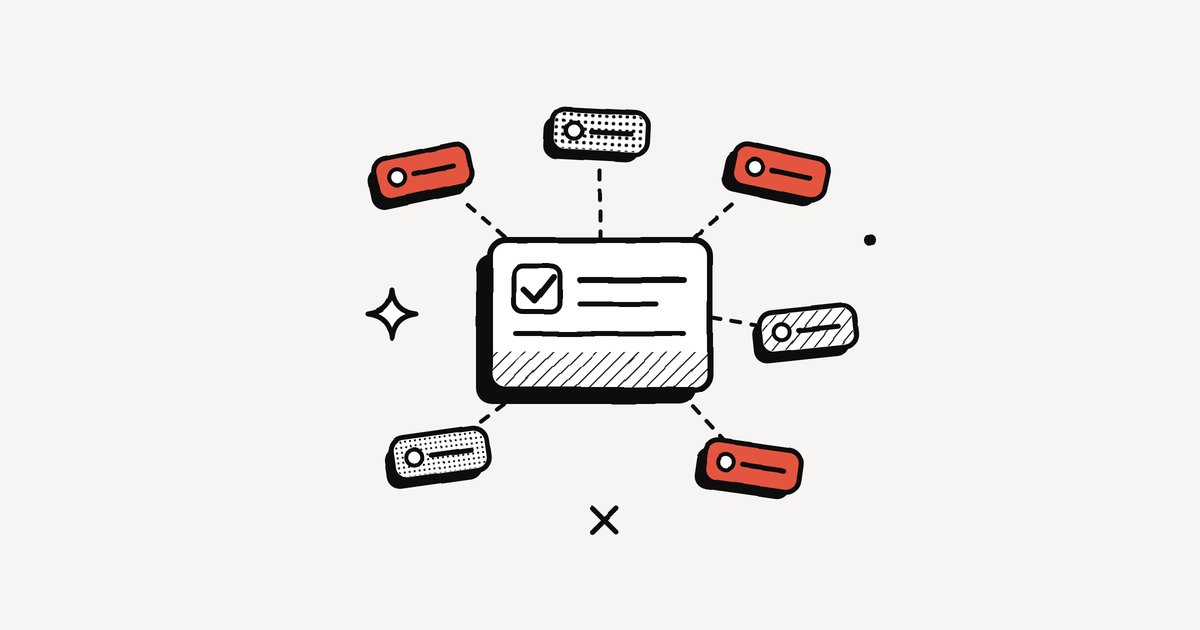
Take an ordinary piece of work: onboarding a new client. Sales marks the deal as won in the CRM. The client emails the signed contract. A project template assigns you twelve onboarding tasks. Brand files arrive in Google Drive, a kickoff call lands in your calendar, and a colleague asks in Slack who is preparing the welcome pack. One piece of work, six notifications in six places, each showing only part of the picture. This is notification fragmentation, and it is how most work now reaches us.
The price of scattered work
It is tempting to shrug fragmentation off as the small price of good tools. But small prices paid hundreds of times a day stop being small. Asana's 2021 survey of 13,123 knowledge workers found people switch between 10 apps 25 times a day, and more than a quarter said switching makes them miss actions and messages (CIO). A study published in Harvard Business Review tracked 137 people across three Fortune 500 companies and found they toggled between apps nearly 1,200 times a day, losing just under four hours a week to reorienting themselves (HBR). And in Salesforce's 2026 survey of IT leaders, only 27% of enterprise applications were integrated with each other (Salesforce).
The onboarding also does not stay the same size. Like a snowball, it gathers more as it moves: more people, more tasks, more files, and every new layer throws off new notifications.
Free ebookThe Language of InterruptionThe research behind every notification you get at work: where they came from, what they cost and what to do about them. 131 pages, free PDF.Get it free →The five types of fragmentation
- Duplicates. The same event announced in several places. The kickoff call arrives as a calendar invite, an email confirmation and a Slack reminder: three notifications for one meeting.
- Information silos. Each tool holds a separate part of the truth. The contract terms live in Gmail, the plan in Asana, the brand files in Drive and the deal in the CRM. No single place shows the whole onboarding.
- Conflicting states. Two tools disagree. The welcome pack is marked done in Asana while a Slack thread still asks who owns it.
- Scattered settings. Every tool has its own rules for what may interrupt you. You mute the client channel in Slack, but Asana still emails every comment.
- Lost threads. Three weeks later the client asks what was agreed about invoicing. The contract email, the kickoff call or a Slack thread? Nobody remembers which tool holds the answer.
How fragmented is your work?
Think of one real project you are working on right now. Answer for that project.
This interactive part needs JavaScript.
Making work whole again
Fragmentation cannot be switched off, but it can be reduced. The aim is not fewer tools at any cost, but making each piece of work feel whole again. Picture the same onboarding, put in order: the project tool becomes its single home, with the contract, files and CRM deal linked inside it. The kickoff invite lives only in the calendar. Slack is for discussion, and every decision made there is noted back on the task. Email copies of task comments are switched off and a daily summary replaces them. The client still produces dozens of notifications, but they now point back to one place.
The cheapest fixes are habits: switching off duplicate copies, linking instead of copying, agreeing what each tool is for. They work best in small teams. The hardest fixes, like grouping related notifications across tools, depend on the tools themselves, which is where the newest layer of software is heading. For the practical, personal side, see how to stop context switching between Slack, Gmail and Asana and the SaaS consolidation checklist.
Frequently asked questions
What is notification fragmentation?
It is when one piece of work is spread across several tools, each sending its own notifications, so no single place shows the whole task and people have to rebuild it as they switch between apps.
What are the types of fragmentation?
Duplicates, information silos, conflicting states, scattered settings and lost threads.
How do I reduce app switching at work?
Give each piece of work one home, link to it rather than copying, switch off duplicate notifications, and agree as a team what each tool is for.
Sources
- App switching is killing your team's productivity (Asana Anatomy of Work 2021), CIO
- Murty, Dadlani and Das, How much time and energy do we waste toggling between applications?, Harvard Business Review (2022)
- Salesforce 2026 Connectivity Report
Fragmentation is a real problem. It is simply spread so thinly across the day that it rarely looks like one.
Keep reading
More from the blog
Who Really Controls Your Notifications?
We have more notification settings than ever and still feel less in control. The four hands on every notification, and why control is really an agreement.
Before You Hit Send: A 4-Question Test for Every Notification
Most of what happens at work should be available, not announced. A four-question test before you notify, and the delivery ladder from quietest to loudest.
Stop, Drop and Scroll: Surviving Fake Urgency at Work
URGENT!! at 4:52 pm on a Friday, unopened by Tuesday. Why fake urgency works on your brain, what it costs, and how fire starters and fire receivers can both stop it.Your unified notification inbox for Slack, Gmail, Outlook and Asana.
Every alert understood, prioritised, and ready to act on. We don’t manage your work. We digest it for you.
No credit card needed